Saturday, February 18, 2012

Create Bootable USB drive

I constantly need to do this and I keep having to look it up, so I am putting it here so I know exactly where to go. Many older computers do not have DVD drives or in my case laptops have defective ones, so I need to create bootable USB's to install new operating systems.

Here are the steps:

Insert USB into machine (for modern operating systems - make sure it is 4GB or bigger)

Go to command prompt: (must "run as administrator")

DISKPART
LIST DISK
SELECT DISK
CLEAN
CREATE PARTITION PRIMARY
SELECT PARTITION 1
ACTIVE
FORMAT FS=NTFS QUICK
ASSIGN
EXIT

Insert Windows OS DVD

:CD BOOT
CD BOOT
BOOTSECT.EXE/NT60 -------> (XP use BOOTSECT>EXE /NT52 )
COPY THE DVD CONTENTS TO THE USB

DONE

Thursday, October 13, 2011

Separating and Merging PDF’s for free


Download PDF Editor here: http://www.pdfill.com/download.html

Choose one of the orange buttons that say download now:


Download and install it.
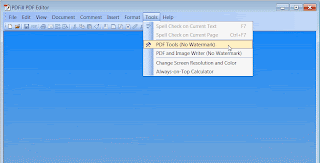
After it is installed start the program and navigate to “Tools” and then to PDF Tools (No Watermark):


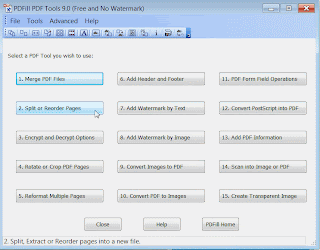
Then click on “Split or Reorder pages”:


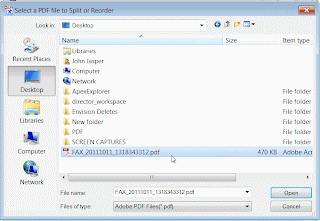
A dialog box will pop up for you to go find your file:


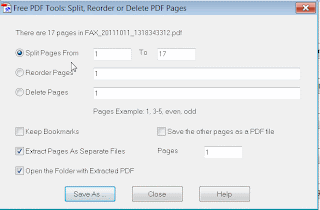
Choose the file to open, then the following box will pop up, telling you how many pages it found and asking you what to do, I chose “split pages” and then typed in “1 to 17” so that it will look at all 17 pages, then I clicked on the checkbox saying “Extract pages as separate files” – (this will create 17 separate PDF’s):


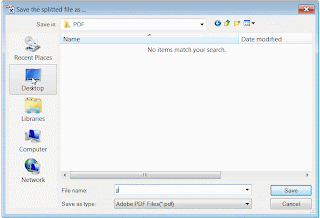
Then click on “Save As” It will then prompt you to “save as:” – choose a directory that you want them to be saved in and then choose a name (here I choose “JJ” which will create 17 separate files called: jj1.pdf, jj2.pdf, jj3.pdf, etc):


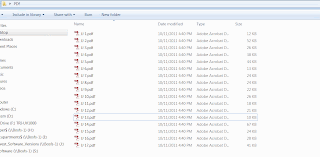
Then Hit “Save” button and it will create the 17 separate files in the chosen directory:


You are done, now merging files is just as easy – choose “Merge PDF Files”, go find the separate files you want to merge and then save as the name you want and you are done.

Tuesday, August 16, 2011

jquery treeview toggle button submitting form

Came across this issue after copying some code from a jquery treeview demo. Once I put the code into a form, it would keep submitting the form before it could drop down the tree.

Found that the sample code had: <button id="add"> This makes the aspx page assume it is of type "submit". I needed to add <button id="add" type="button"> to make it stop submitting on click.

Wednesday, July 27, 2011

Creating Windows 7 OEM image for deployment

Create winpe boot cd
· Download and install WAIK
· Choose deployment tools command prompt from start menu
· copype x86 c:\winpe_x86
· copy c:\winpe_x86\winpe.wim c:\winpe_x86\iso\sources\boot.wim
· copy “c:\program files\windows aik\tools\x86\imagex.exe” c:\winpe_x86\iso\
· oscdimg –n –bC:\winpe_x86\etfsboot.com c:\winpe_x86\iso\ c:\winpe_x86\winpe_x86.iso

· Verify the iso has been created, and then burn to CD

Configure template machine (oem)
· Install windows, do not enter anything when prompted for product key – puts you into 30 day trial
· Install other applications, configure desktop background, ip configuration, mapped drives, etc
· Install office 2010 but *do not activate*
· Run all updates on office and windows
· HKEY_LOCAL_MACHINE\SOFTWARE\Microsoft\Office\14.0\Registration Delete the whole "Registration" key

Acquire image
* build answer file first - blog to follow
· Run Sysprep from c:\ windows\system32\sysprep directory
· Choose: oobe
· Choose: Generalize
· Choose: Shutdown
· Choose: OK
· Machine shuts down
· Insert winpe boot cd
· Start machine (have external drive installed)
· Verify drive assignments (find out what is where)
· imagex /compress fast /check /capture e: d:\win7img.wim “Windows 7 Professional” “win7and office 2010”

Applying image
· Insert boot PE disk
· diskpart
· select disk 0
· clean
· create partition primary size 12000 (this is megabytes)
· format quick fs=ntfs label=”Windows 7”
· active
· assign letter=C
· list disk
· list volume
· exit
· imagex /apply d:\win7img.wim 1 c:\
· bcdboot c:\windows /l en-us

· Restart machine into windows welcome mode

Thursday, June 23, 2011

Working with GnuCash

GNUCash - great OpenSource replacement for Quicken and even Quickbooks;

.gnucash file is gzipped xml file which you can peek into for info that may not be available in the front end like vendor list, delete invoices (unfortunately the only way), etc

C:\Program Files\gnucash\share\gnucash\guile-modules\gnucash\report contains the .scm files (text files coded in Scheme - a form of LISP) to manipulate invoices' look, etc.

These scheme scripts (.scm) will need to be re-edited (more likely saved then re-imported) when upgrading GNUCash

Tuesday, June 21, 2011

Quickly remove background using Gimp

The more I use GIMP the more I have come to understand it can do everything I thought I needed PhotoShop to do.

Removing background (creating transparent file)
Open file
Tools -->Paths
Use zoom to get real defined if needed
Once path completed, click Shift-V to make selection
Control-I to select inverse
Go to Layer -->Transparency--> Add alpha channel
Hit "delete" key; now your background is deleted

very easy !

Monday, April 12, 2010

Re-set Fedora root password

Came across the need to re-set my forgotten root password on my Fedora 11 box. The alarmingly simple solution makes it very evident that physical access to machines is extremely important to safeguard.

I am using GRUB so the trick was to show the choice of kernals it wanted to boot to, choose "e" to edit one of them and add "single" at the end of the kernal boot command, then choose "b" to boot that kernal, it will push you into single mode with root priveleges

type in "passwd" and choose a new root password.

apparently LILO is just as easy; booting with: "linux single" gives you the same result.

Saturday, April 10, 2010

Linux Mint Partition Problem

I came upon this problem installing Linux Mint 8. This is a great looking Linux distribution based on Ubuntu. Definitely would recommend this to users of Windows who want to try a Linux that acts much like Windows

After starting up with the iso disk into the live cd, when you go through the "install mint" wizard, there will be no partitions that show up at the 4th step and you can't continue. Starting the OEM install at the CD boot has the same results.

The trick to getting the partition table to show up is to run this command from the terminal once in the live cd screen:

sudo apt-get remove dmraid

Then run the wizard and the partitions will show up so you can continue.

Thursday, March 25, 2010

Task scheduler issues on Server 2008

Microsoft has changed the task scheduler pretty drastically since windows XP and it is very hard to get used to. I had a recent issue where I couldn’t tell if my .bat file I use for backups had really run – the bat file is supposed to write to 3 separate log files while running so I can view any problems and verify what it did. Well, the task seemed to run however, the log files were not updating. After investigating I found that the following steps should be carefully run through when creating a task in 2008:

• Make sure that the task is set to "configure for Windows Vista or Windows 2008" on the first page of the task properties (under the "general" tab)
Very important when writing to log files --> Make sure that the task is set to "start in" the folder that contains the batch file: open the task properties, click on the "actions" tab, click on the action and then the "edit" button at the bottom. In the "Edit Action" Window there is a field for "start in (optional)" that you set to the path to the batch file.
• Make sure that the task is running as an account that has explicit "Full access" permissions to all these things: The .bat file itself, the folder containing the .bat file, and the target files/folders that are affected by the .bat script.
• Make sure that the account running the task is a member of the local "administrators" group for this machine
• Make sure that the task is set to "run whether logged on or not"

Thursday, January 28, 2010

Delete hiberfil.sys hibernation file in Vista

File is as large as your physical memory which is very large.
Can easily do this is in XP by disabling hibernation however Vista it is more difficult. Do it via command line: powercfg -h off

Wednesday, January 27, 2010

batch file to backup and encrypt to disk

There are times when backing up files to a USB drive is the only method that a client has chosen to perform their backups on their Windows machines. The best way to ensure that that USB is not stolen or lost, and then read, is to encrypt the files. Anyone who knows me knows that I love creating my own scripts and using open software to avoid high priced vendor solutions. Here is a quick process to give the backups some decent security.

Download and install Truecrypt (Excellent open source on-the-fly encryption tool).
Create encrypted volume inside USB (call it "backups" for this exercise)
Make sure you use strong password and remember it or keep it somewhere you can access it again
Download Robocopy (or Rsync)
Batch script:

"c:\program files\truecrypt\truecrypt.exe" /q /s /v e:\backups /lj /a /p password
robocopy C:\Users\Administrator\Documents j:\ *.doc
"c:\program files\truecrypt\truecrypt.exe" /q /dj

(here I create volume j, using weak password called "password" silent mode, don't show GUI, automount volume, then call robocopy to do the backup of .doc files in the Documents directory to the encrypted volume, then unmount volume)

There you have it, a USB thumbdrive with your encrypted files out of view.

Wednesday, January 13, 2010

Cannot copy file access is denied windows XP

Came across this one today; bought 4 new Dell computers and was setting them up. Ok first thing I have to do is copy a directory over from the old computer to thenew machine, half way through the copy and I get cannot copy access is denied.
I try everything, I disable file sharing, turn off firewall and a few other things. I notice that at every reboot Norton asks me to sign up for their trial. Being a new computer and I won't be using it, I just click on "remind me later". Well, could it possibly be Norton stopping this file (I notice it is a .exe file); this could be possible but why since I have told it I don't want to install it.
So I click to uninstall Norton trial offer (which I never accepted) and now everything works. I guess I don't know why Dell puts this on yet it indicates that it is not installed and you have the option to install it when you want. I guess this is incorrect.

Wednesday, December 16, 2009

Simple way to prevent printing of web page

Basically, there is no way to prevent a user who really wants to print a web page out, it is a simple as them hitting their "Print Screen" button, etc...

But for intranet purposes, letting your users know that some pages are not to be printed, you can add the following code to the head section:

{{Code is changed slightly by removing "<" in front of tags for display here:}}

head>
style type="text/css" media="print">
body { visibility: hidden; display: none }
/style>
/head>

This will only print out a blank page when the user goes to "file"--> "print" (print conventionally)

A user can still print out by unconventional methods but, by doing so, is understanding the company does not want it printed, and he is behaving improperly.

Enable thumbnail view and photo editor in Windows Server 2008

When trying to use Server 2008 more like a desktop, you will find some options need to be enabled so that it behaves more like a workstation.

Two things that come to mind are thumnail view which is disabled and Microsoft Windows Photo and Fax viewer (so that you can view the pictures with something other than "Paint")

For Thumbnails:
Click on "start" --> "run", then type in "SystemPropertiesPerformance" Check off "show thumbnails instead of icons and then "OK"

For "Photo and Fax viewer", you need to enable the "Desktop Experience" in the Server Manager, go to "Features" --> "Add Features" and choose "Desktop Experience". the Windows Photo and Fax viewer will then be enabled.

Wednesday, December 9, 2009

Sharing HP Deskjet 5600 series (HPA) on Windows 7

Just finished sharing my HP 5850 printer on my home network in Windows 7 with my Windows XP machine. Sounds easy yes?. Well it took me a while to do this, here is what I went through.

USB connection to the 5850 from Windows 7 machine, whoops, no real driver for this so you need the 5600 Series (HPA) driver for it to function. Ok now sharing it out, well you have to enable sharing for people who do not have an account on that machine; (hey, this is a home network) another step. now to add additional drivers (like, for XP but nope, can't do that cause it asks for .inf file and I can't find it 0k didn't really investigate if it was there, but i am fairly sure the lay-person won't find it)

Now, going to the XP machine I point to the windows 7 machine and low and behold it says "driver is not installed on that machine, so browse to it on your own machine", but then it is nowhere to be found on the machine (or I couldn't find the driver as I checked every $win inf$ file there was)...and also guess what, you won't find that HPA driver anywhere at HP.com either.

So... I installed a 5800 series printer on my xp machine, pointed it to the local port and said just install the driver even though the it cannot find the printer. Then I went to the newly created printer and changed the port; created new port and called it \\(windows7machine)\(sharedprintername)

Now I can print to the shared printer on the Windows 7 machine.

Anybody got a better way?

Wednesday, December 2, 2009

Remove User Account Control warning from Windows Vista

Vista allows you to turn off the UAC via -->Control Panel -->User Accounts -->"Turn off User Account Control" but then creates an annoying "warning User Account Control Turned off" pop-up balloon which you then can't shut off. I'd like to someday create a poll on which is more annoying....the User account control or the warning that it is turned off.

Anyway, turn it off in the registry by HKey_LOCAL_MACHINE\SOFTWARE\Microsoft\SecurityCenter
Add this value:
Data Type: DWORD
ValueName: UACDisableNotify
Value: 1 (dec)

Restart

Wednesday, November 18, 2009

install command line ssh client on Windows

It is necessary when communicating with Linux and Unix machines that it is done securely and no longer with telnet, so every Windows user should have a ssh client on their machines. I prefer a command line client and find that the Cygwin environment is almost a must for Windows users.

Go to http://www.cygwin.com/ and download the setup to install a "Linux-like" shell and make sure you choose "openssh". Now you will have a free ssh client to communicate with you Linux and Unix machines. Don't forget to put the directory path to the Cygwin bin directory in your Windows path statement so you don't have to "cd" to the right directory.

Monday, November 16, 2009

Windows 7- Windows Search Service does not start

If you have trouble searching for files, then your Search Service might not be on.
Follow these steps to rebuild your index and start up the service.

1/2 Go to :
Open Control Panel > System & Maintenance > Indexing Options. In the Advanced Options, Click on Restore Defaults and also Rebuild Index. Click OK.


2/2 Next go to :
Control Panel\All Control Panel Items\Administrative Tools\Services
Scroll down until you find windows search service.
Right click and choose start


Hope this helps you.

Thursday, October 29, 2009

ASP code to guard against SQL injection

It is necessary whenever you are writing a SQL query in your ASP code, to guard against SQL injection, here are examples to use when in production mode:

If the field dEmployeeNumber in the DB is *NOT* a number:

Code:
SQL = "SELECT tEmployeeNumber, tTopic, tDepartment, tTime FROM tblSurvey "
& " WHERE tEmployeeNumber='" & Replace(dEmployeeNumber,"'","''") & "'"

If it *IS* a number:

Code:
SQL = "SELECT tEmployeeNumber, tTopic, tDepartment, tTime FROM tblSurvey "
& " WHERE tEmployeeNumber=" & CLNG(dEmployeeNumber)


with proper credit to Bill W from 4guysfromrolla

Friday, October 9, 2009

function to format phone number field in form

Needed to format a phone number field as soon as the person typed it into the form, I like this solution:

(tag) script (endtag)
function formatPhone(fld)
{
var ph = fld.value.replace(/[^\d]/g, "" ); // zap all except digits
// if user entered the leading 1, just zap it
if ( ph.length == 11 && ph.charAt(0) == "1" ) ph=ph.substring(1);
if ( ph.length != 10 )
{
alert("Sorry, '" + fld.value + "' is not valid phone number");
return false;
}
fld.value = "(" + ph.substring(0,3) + ") " + ph.substring(3,6) + "-" + ph.substring(6);
return true;
}
(endtag)script(tag)

and it is called by:
onchange="formatPhone(this);" - or it could be used during validation....